LinkedIn Outreach for B2B Outbound in 2026: How to Book Meetings Without Getting Ignored or Restricted
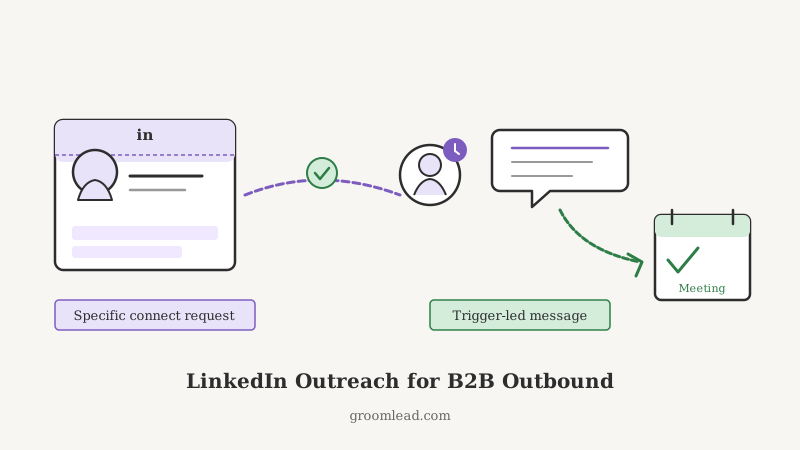
Short answer: LinkedIn outreach works in B2B outbound when you treat it as a relationship channel, not a second email inbox. That means a profile that reads like a resource instead of a pitch, connection requests that give a reason to accept, messages that lead with the prospect’s context instead of your product, and a sending pace that stays under LinkedIn’s limits so your account never gets restricted. Done that way, LinkedIn is the highest-trust channel in outbound because the prospect can see exactly who you are before they reply. Done the lazy way (blast connect, auto-pitch on accept), it burns your account and your domain reputation at the same time. This post covers how to run the channel so it books meetings instead of collecting ignores.
Most outbound teams bolt LinkedIn onto their sequence as an afterthought: a “send connection request” step wedged between two emails, with a templated pitch fired the second someone accepts. That motion converts poorly and quietly damages the brand. The reason is simple. LinkedIn is a visible channel. When you send a bad email, one person sees it. When you send a bad LinkedIn message, that person sees your name, your photo, your title, your company, and your history before deciding whether you are worth a reply. The bar is higher, and that is exactly why the channel is worth doing well.
Why LinkedIn Belongs in Your Outbound Motion
Email still carries the volume in outbound, but LinkedIn does three things email cannot.
First, it adds a face to the name. A prospect who has seen your profile, maybe accepted a connection, and read one useful message is far more likely to open the email that follows. The channels compound. LinkedIn warms the inbox, and the inbox does the closing.
Second, it survives email deliverability problems. When your domain is having a bad week or a prospect’s spam filter is aggressive, LinkedIn is a parallel path to the same person. If your email never lands, a well-timed LinkedIn touch still reaches them. That redundancy is why the strongest sequences run both channels in parallel rather than treating one as a fallback.
Third, it exposes signals email hides. Job changes, promotions, new hires, posts, and shared connections are all visible on LinkedIn and all give you a legitimate reason to reach out. This is where trigger-based outbound lives. A tool like Champions watches your existing customers and past champions for exactly these role changes and surfaces the move the moment it happens, so a former user landing in a new seat becomes a warm LinkedIn opener instead of a cold guess.
Fix the Profile Before You Send Anything
Every connection request and message drives traffic back to your profile, and the profile decides whether the prospect accepts or replies. If it reads like a billboard, you lose them there. Optimize four things.
Headline. Do not use your job title alone. Use a line that states who you help and what changes. “Helping B2B teams turn cold lists into booked meetings” beats “Account Executive at GroomLead” every time, because the prospect learns what you do for people like them in the first two seconds.
Banner and photo. A clear headshot and a banner that names the outcome you deliver. This is free real estate that most reps waste on a stock skyline.
About section. Write it to the prospect, not to a recruiter. Lead with the problem you solve and the proof you solve it. One short paragraph, a few specifics, a soft call to action.
Activity. Post or comment enough that your profile is not a ghost town. A prospect who lands on a page with recent, useful activity trusts the outreach more than one who finds a dormant account. You do not need to be an influencer. One thoughtful post a week and a handful of real comments is enough to look alive.
Connection Requests That Get Accepted
The connection request is the whole game on LinkedIn, because a message to a first-degree connection lands in the primary inbox while a message to a stranger lands in a folder most people never open. Getting the accept matters more than getting the reply, at first.
There is an ongoing debate about whether to send a note with the request or leave it blank. Blank requests often get accepted at a higher raw rate because they look casual. Requests with a short, specific note get accepted at a lower rate but produce far warmer conversations, because the people who accept already know why you are there. For outbound, the note usually wins. Keep it under 200 characters and give a real reason.
A request note that works looks like this: reference something specific (a post they wrote, a shared connection, a company event, their new role), state briefly why you are reaching out, and stop. Do not pitch in the connection request. The request is asking for a handshake, not a meeting.
What kills accept rates: a note that is clearly templated, a note that pitches, and a note that flatters without specifics. “Love what you’re doing at [Company]” reads as a mail merge because it is one.
The First Message: Lead With Their Context, Not Your Product
Once a request is accepted, the reflex most teams have is to fire a pitch. Resist it. An accepted connection is permission to start a conversation, not permission to sell.
The first message should do one job: earn a reply. Structure it in three short beats.
Beat one, the reason. Anchor to why you are in their world right now. A trigger event is the strongest anchor: a new role, a hiring spree, a product launch, a change at a competitor. Signal tools make this easy to source at scale. CAM tracks competitor website and LinkedIn activity, so your outreach knows whether it is entering open or defended territory before you send a word.
Beat two, the relevance. Connect their likely priority to a problem you solve, in one sentence, without listing features. You are showing you understand their world, not that you have a product.
Beat three, the ask. Low friction and specific. A question they can answer in one line beats a calendar link in the first message. “Is booking more qualified meetings a priority for the team this quarter, or is the pipeline already where you want it?” invites a reply. “Grab 30 minutes here” invites silence.
Keep the whole message under 90 words. The prospect can see your profile for the rest of the context, so the message does not have to carry everything.
Blend LinkedIn With Email, Do Not Silo Them
The mistake that caps most LinkedIn programs is running the channel as an island. LinkedIn touches and email touches should reference the same thread of value and reinforce each other on a single timeline, not run as two disconnected campaigns.
A blended sequence for a single prospect might look like this:
- Day 1: connection request with a specific note.
- Day 2 (if accepted): a short first message that earns a reply.
- Day 3: email one, referencing the same trigger, so the two channels feel like one coherent outreach.
- Day 6: a LinkedIn interaction that is not a pitch (a genuine comment on their post, or a useful resource sent as a message).
- Day 9: email two, a value add, no re-pitch.
- Day 14: a soft close on whichever channel has shown the most engagement.
The point is that a prospect who ignores an email might reply to a LinkedIn message, and vice versa. Running both on one timeline means you reach the person where they actually respond. GroomLead builds outbound around this kind of multichannel, signal-driven sequence, so LinkedIn and email steps fire on one plan instead of two teams stepping on each other. For the email side of this motion, our multichannel outbound cadence guide covers the sequencing in detail.
Personalization at Scale Without Sounding Like a Robot
The tension in LinkedIn outreach is the same as in cold email: you need volume to build pipeline, and you need relevance to get replies, and those two pull in opposite directions. The resolution is not to personalize every word, it is to personalize the opener and the reason, then keep the rest consistent.
The highest-leverage personalization is the trigger and the first line. If those are specific and current, the prospect forgives a body that is more templated. If those are generic, no amount of clever copy in the body saves the message. This is the same principle we cover in our cold email personalization guide: personalize the parts that prove you did your homework, standardize the rest.
For teams running real volume, an AI-driven virtual SDR like VSDR can execute the repetitive parts of the motion (sending requests within limits, sequencing the follow-ups, drafting first-pass openers from a prospect’s profile and recent activity) while a human reviews the trigger and approves the send. The goal is not to remove the human, it is to spend the human’s attention on the 10 percent that decides whether the message lands.
Stay Inside the Limits or Lose the Account
LinkedIn actively restricts accounts that behave like bots. In 2026 the practical guardrails are these, and crossing them risks a warning, a temporary restriction, or a permanent ban.
- Keep connection requests to roughly 15 to 25 per day per account, not hundreds. Ramp new accounts up slowly.
- Do not use unofficial automation tools that scrape the interface aggressively. LinkedIn detects them, and a banned account takes months of trust to rebuild.
- Keep your accept rate healthy. A pile of pending, ignored requests signals spammy behavior and lowers your standing. If accept rates drop, slow down and improve the note.
- Spread activity across the day like a human would, not in a single automated burst.
The math that matters: a restricted account produces zero pipeline. Ten thoughtful, well-targeted requests a day from a healthy account beats two hundred sprayed requests that get the account flagged in a week. Treat sending capacity as a scarce, compounding asset, the same way you treat domain reputation on the email side.
Measure the Right Things
Vanity on LinkedIn is easy to accumulate and worthless to report. Track the metrics that predict pipeline instead.
- Accept rate on connection requests. Below 30 percent means your targeting or your note needs work.
- Reply rate on first messages, measured against accepts, not against requests sent.
- Positive reply rate, meaning replies that move toward a conversation, not polite declines.
- Meetings booked attributed to the LinkedIn touch, even when the actual booking happens over email.
That last attribution point is where most teams undercount LinkedIn. A meeting that books via an email reply was often warmed by a LinkedIn connection three days earlier. If you only credit the channel that closed, you will underinvest in the channel that opened. Track the full path. Our outbound KPIs guide covers how to build that attribution so activity metrics do not masquerade as results.
Putting It Together
LinkedIn outreach rewards the teams that treat it as what it is: a high-trust, high-visibility channel where the prospect can see exactly who is reaching out. Fix the profile first, because every touch drives back to it. Earn the connection with a specific, non-pitchy note. Lead the first message with the prospect’s context and a real trigger, not your feature list. Run LinkedIn and email on one timeline so the channels compound. Stay well inside the sending limits so your account keeps producing. And measure the full path from connection to booked meeting so you invest in what actually opens doors.
Sourced from live signals (a job change surfaced by Champions, a competitor move caught by CAM) and run as one coherent motion, LinkedIn stops being an afterthought step in the sequence and becomes the channel that makes the rest of your outbound land warmer. That is the version of LinkedIn outreach GroomLead builds for teams in 2026: fewer touches, better timed, and pointed at the people actually in motion.
Ready to engineer your own GTM system?
GroomLead builds the outbound infrastructure behind 100+ agencies, and the tools inside this post.
Book Strategy Call