Cold Email Reply Management in 2026: How to Sort, Route, and Respond to Replies Before They Go Cold
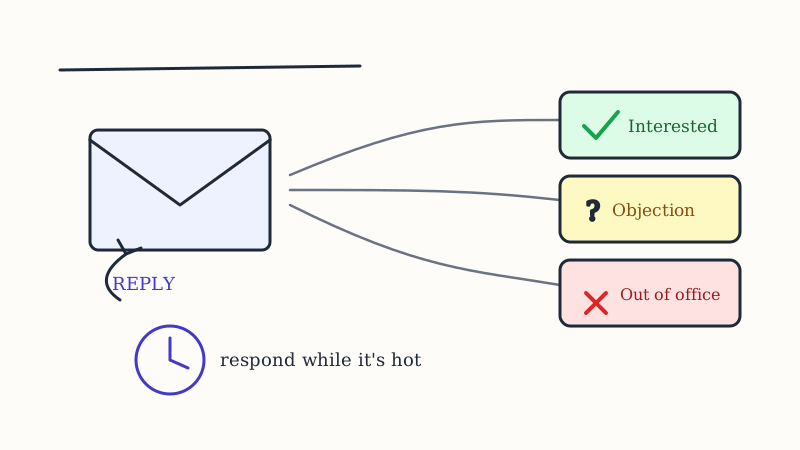
Most outbound teams pour their effort into the send and almost none into what happens after someone writes back. That is backwards. The reply is the only moment in the entire sequence where a stranger has raised their hand, and it decays faster than any other signal in your pipeline. Cold email reply management is the discipline of catching every response, sorting it correctly, and answering the ones that matter while the intent is still warm. This guide covers what reply management actually is, why speed and categorization decide your conversion, how to handle each reply type, and how to build the system so nothing slips. GroomLead treats the reply layer as a core part of the outbound machine, not an afterthought, and you can see how that fits at GroomLead.
What is cold email reply management?
Cold email reply management is the process of capturing, categorizing, and responding to every reply an outbound campaign generates, so that positive intent turns into booked meetings and everything else is handled cleanly. It sits between your sequencing tool and your calendar. The sequence gets the message in front of the right person, and reply management decides what happens the moment they answer.
It has three jobs, and teams that only do the first one leave most of their pipeline on the table.
- Capture. Pull every reply into one place, across every inbox and sending domain, so nothing hides in a rep’s personal folder.
- Categorize. Label each reply by intent: interested, objection, referral, not now, out of office, or unsubscribe. The label decides the next action.
- Respond. Send the right follow-up fast, whether that is a calendar link, an answer to an objection, or a routed introduction to the right person.
Skip categorization and every reply looks the same, so reps triage by whatever is on top. The interested buyer who wrote back at 9 a.m. waits behind twelve auto-responders, and by the time anyone reaches them the moment has passed.
Why does reply speed matter so much?
Reply speed matters because buying intent is perishable. When someone answers a cold email with a real question, they are, for a brief window, actively thinking about the problem you solve. That window is measured in minutes and hours, not days. Answer inside it and you are talking to a warm prospect. Answer two days later and you are cold-emailing them again, except now you have burned the one reply they were willing to give.
The same logic that governs inbound lead response governs outbound replies. We laid out the timing math in the speed-to-lead response time playbook, and it holds here: the difference between a five-minute reply and a five-hour reply is often the difference between a booked meeting and silence. The problem is that outbound replies do not arrive on a schedule. They land while your rep is on a call, asleep in another timezone, or heads-down writing the next batch. Without a system, speed depends on luck.
This is exactly where an AI reply layer earns its place. Underfive.ai watches the inbox, categorizes each reply by intent the moment it arrives, and drafts a context-aware response within minutes, so a positive reply gets a real answer while the prospect is still at their desk rather than sitting unread until someone gets to it. The rep stays in control of what goes out, but the clock stops being the enemy.
How should you categorize replies?
Categorize replies by the action they require, not by sentiment alone. A useful set of buckets is small enough that labeling is instant and complete enough that every reply has a home.
- Interested. They want to talk, see a demo, or learn more. This is the only bucket where minutes matter, so it jumps the queue.
- Objection or question. They pushed back on price, timing, fit, or a competitor. These are not rejections, they are requests for information, and they convert well when answered directly.
- Referral or wrong person. They pointed you to a colleague. This is warm gold, because you now have an internal reason to reach the right buyer.
- Not now. Real interest, wrong timing. These belong in a nurture track with a dated reason to follow up, not in the trash.
- Out of office and auto-replies. Machine noise, but sometimes an auto-reply hands you a direct dial or an alternate contact worth capturing.
- Unsubscribe or negative. Suppress immediately and honor it. Getting this wrong is a deliverability and compliance problem, not just a manners problem.
The point of the buckets is routing. Each label maps to one next action, so a reply never sits in an ambiguous state where a rep has to stop and decide what it even is.
How do you respond to each reply type?
Match the response to the bucket, and keep the first reply short. The goal of a reply is to earn the next step, not to close the deal in one message.
- Interested. Confirm and make booking frictionless. Offer a specific time or a link and remove every extra step. Do not send a discovery interrogation before they have picked a slot.
- Objection or question. Answer the actual question in one or two sentences, then propose a next step. If they raised a competitor, this is your opening to differentiate, and our competitor displacement playbook covers how to do that without trashing the incumbent.
- Referral. Thank the sender, ask for a warm introduction if it is easy, and reach the named person with the referral as your opening line. A message that starts with a colleague’s name is not a cold email anymore.
- Not now. Agree on a concrete date and set a reminder tied to a trigger, such as their next budget cycle or a hiring signal, so the follow-up lands with a reason.
- Out of office. Parse it for a new contact or a return date, then re-queue. No human effort required.
Whatever you send, it must reach the inbox to matter. Reply-handling and deliverability are the same fight from two ends, and the practices in the cold email deliverability guide keep your responses landing where the prospect will see them.
How does reply data make the next campaign better?
Every reply is a labeled data point about your message and your targeting, and a reply-management system that throws that data away is leaving compounding gains on the table. Read the pattern of objections and you learn what your positioning is failing to answer. Read who replies positively and you sharpen your ideal customer profile. Read who never replies and you learn which segments to cut.
That feedback loop is strongest when the reply context flows back into how you build and send the next round. Triguna enriches the contacts who engage so you can see what the converters have in common and find more like them, while CAM tracks competitor and account activity so a lukewarm “not now” can be re-timed to the moment that account actually enters a buying window. A reply that says “not now” in March becomes a well-timed touch in June when the signal fires, instead of a note that rots in a spreadsheet.
The referral and job-change signals compound the same way. When a champion who once replied moves to a new company, that is warm pipeline waiting to be worked, and Champions surfaces those moves so a past positive reply becomes a new opening at a new account. Reply management is not just cleanup after a send. It is the input that makes every future send smarter.
How do you build a reply-management system that scales?
A reply-management system scales when the routine parts are automated and human attention is reserved for the replies that deserve it. Build it in layers.
- Consolidate inboxes. Route every reply from every domain into one queue. Reps should never have to check five mailboxes to find the interested buyer.
- Auto-categorize on arrival. Apply the intent labels automatically so triage is instant and consistent, not a judgment call that varies by rep and mood.
- Draft the routine responses. Let the system prepare the out-of-office re-queues, the booking confirmations, and the first-pass objection answers, so a human is editing rather than writing from scratch.
- Escalate the high-value replies to a person. A hot interested reply or a nuanced objection deserves a real rep, and the system’s job is to get it in front of them fast with the context attached.
- Feed a first-touch engine that already writes well. The cleaner your outbound copy, the higher the share of replies that are worth having. VSDR deploys an AI virtual sales development rep that researches each account and writes a personalized first touch, which raises reply quality upstream so your reply-management layer spends its time on real conversations instead of digging out the occasional yes from a pile of noise.
Built this way, reply management stops being a bottleneck that depends on which rep happens to be online. It becomes a standing system where speed is guaranteed, categorization is consistent, and every reply either advances or is cleanly closed.
The takeaway
The reply is the highest-value event in outbound and the one most teams handle worst. Capture every response in one place, categorize it by the action it requires, and answer the interested ones while the intent is still warm, because that window closes in hours. Handle objections as questions, treat referrals as warm intros, and re-time the “not now” replies to the moment the account is ready. Then feed the reply data back into your targeting so each campaign gets sharper. Do that consistently and you convert far more of the hand-raises you already earn, without sending a single extra email. If you want that reply layer built and run as part of a full outbound motion instead of stitched together by hand, talk to GroomLead.
Ready to engineer your own GTM system?
GroomLead builds the outbound infrastructure behind 100+ agencies, and the tools inside this post.
Book Strategy Call